 Español
 বাংলা
 Bahasa Melayu
 Français
TopX Login: Choose Your Method and Recover Access
TopX login opens from Log In at the top right. Choose Google, or enter your e-mail and password. Phone login uses your country code, number and password. If you have forgotten your password, the e-mail tab has the Forgotten your password? link.
- Choose the method linked to your account: Google, e-mail or phone number.
- E-mail and phone sign-in use your password; TopX has no two-factor step.
- Use a unique password.
- The e-mail tab contains Forgotten your password?; the support chat is available if you cannot regain access.
TopX login at a glance
The login window gives you a choice of methods for accessing your existing account.
| Account detail | What applies |
|---|---|
| Where to start | Log In at the top right, beside Registration |
| Sign-in methods | Google, e-mail or phone number |
| Protection | Password only; no two-factor authentication |
| Password recovery | Forgotten your password? on the e-mail tab |
| Account rule | One per person, family, address, IP and device |
| India account currency | INR (₹), selected at registration and fixed afterwards |
| Support | 24/7 chat |
| Interface languages | English and Hindi are available |
If you have no account yet, registration covers creating one and choosing your currency.
Compare Google, e-mail and phone login
Google uses the connected Google account. If you use an e-mail address or phone number instead, enter the password for your TopX account. Phone sign-in also needs the country code selected from the list.
| Method | What you use | Choose it if |
|---|---|---|
| The Google button and connected account | Your TopX account is connected to Google | |
| Your account e-mail address and password | You use e-mail sign-in or need the password recovery link | |
| Phone | Country code, phone number and password | You sign in with your account phone number |
The e-mail tab gives you both password entry and the recovery link. If you choose phone sign-in, use the country-code list alongside your number. Confirming that number in your profile is a separate account task needed by the cashier.
Open the login window to use your account: Go to the site.
Check your account before using Wallet
Your phone confirmation and identity checks are separate from signing in. Use this checklist to keep track of access and account setup; marking an item here does not confirm it with TopX.
- Login steps
Sign in to your account
Choose your existing Google, e-mail or phone login. - Account menu
Add and confirm your phone
Use your profile to provide the number the cashier needs. - Verification
Complete first-step verification
The first KYC stage is the personal-details questionnaire. - Payments
Make a deposit
Use Wallet for funding your account in its selected currency.
Password protection
A unique password is the protection to focus on: TopX has no two-factor authentication. Use a password you do not use for another account. In Account, Change password lets you replace it; the account details also include the date of the last password change.
Phone confirmation belongs in your profile, while the questionnaire belongs to KYC. The verification requirements explain the identity stages separately from the choice of login method.
Use the login window on computer or phone
Log In is beside Registration in the top bar. On a computer it opens a window over the lobby; on a phone it opens a sheet from the bottom. Both give you the Google button and the e-mail and phone options.

On a computer
The desktop window places Google above the method tabs. If you choose e-mail, supply your address and password. If you choose phone, select your country code and supply your number and password. The Log In button submits the e-mail or phone form.
On a phone
The phone top bar keeps Log In next to Registration. Tap Log In to open the sign-in sheet, then choose the method for your existing account. Google is above the tabs; the e-mail option includes Forgotten your password? beneath the password entry.
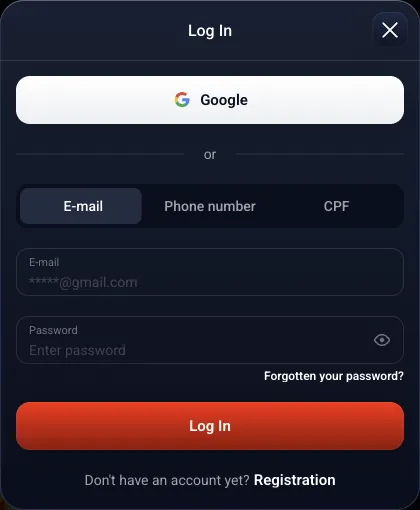

Registration at the foot of the window is for creating an account. If you already have one but cannot access it, use recovery or account support for that account.
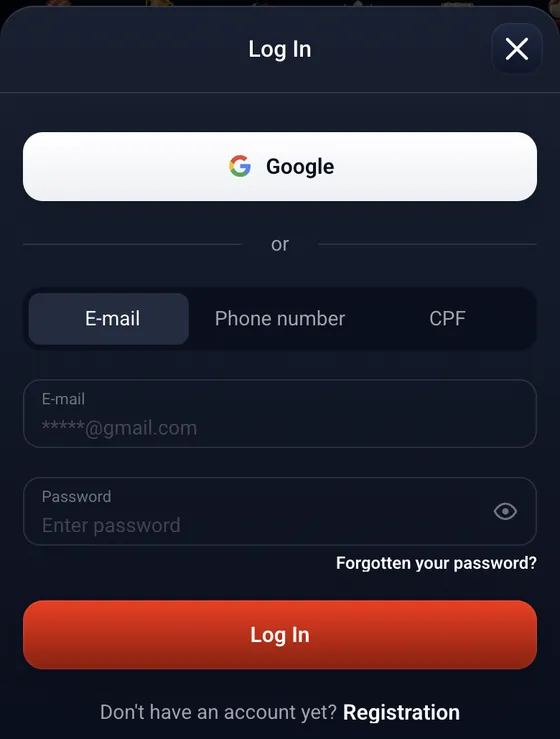
Find the password recovery option
Forgotten your password? is on the e-mail tab inside Log In. If a forgotten password is keeping you out, use that link. The support chat handles access problems, and lost-access requests can go to the operator by e-mail.
Forgotten password
Open the e-mail tab and select Forgotten your password? beneath the password entry.Recovery has not restored access
Contact the 24/7 Support chat about access to your existing account.Lost access
Send lost-access requests to info@topx.one. This is also the address for identity documents.
The operator lists support@topx.one for general support enquiries. For lost access or identity documents, use info@topx.one; support contacts explain which address handles each request.
Match an access problem to the account rules
An account restriction can affect access even when you remember your password. The rules cover inactivity and self-exclusion, as well as duplicate accounts and requests for age documents. The interface can also display a regional availability message.
No login for 12 months
TopX sends a termination notice. If you still do not sign in within the next 30 days, the agreement ends.An active self-exclusion
Exclusion runs from 6 months to 5 years and cannot be cancelled during that period. After it ends, request a return at info@topx.one.A duplicate account
The rules prohibit a second account. Contact support about the existing account rather than creating another.A request for age documents
TopX may request proof of age and suspend an account. Identity documents can be sent to info@topx.one.A regional availability message
TopX may display a message that services are unavailable in your region. Ask the support chat about the message.
Password recovery addresses a forgotten password; an account condition needs support attention. If an age-document request is involved, the identity verification requirements explain the documents and checks separately from signing in.
Use your existing account on mobile
Your existing account is used on the mobile website, in the Android APK and through the iPhone PWA shortcut. Android installation uses a file from the site; on iPhone, Safari adds the site to the home screen.
Android
The APK is supplied through the site after registration. Use your existing account to sign in.iPhone
The PWA is a home-screen shortcut added through Safari, using your existing TopX account.
A home-screen shortcut opens the mobile site. The app and browser options explain the installation routes; the same login choices apply to your account.
Account and mobile terms
- KYC
- Know Your Customer: the identity checks required by TopX before a withdrawal.
- APK
- The Android installation file supplied through the TopX site after registration.
- PWA
- Progressive Web App: the TopX website added to the iPhone home screen through Safari.
Account terms to know
TopX accounts are for adults aged 18+. Keep the account in your own name and use your own payment details.
Only one account is allowed per person, family, address, IP and device; transferring an account is prohibited. The first withdrawal requires completed verification. Signing in is separate from those withdrawal checks.
An account with no bets, deposits or withdrawals for 13 consecutive months is subject to an inactivity fee under the terms. This is separate from the no-login termination rule described above.
For payout ceilings and processing periods, see withdrawal terms. A daily deposit limit can be requested at info@topx.one; account limits and self-exclusion cover the available controls.
Sources
Where the facts on this page come from
- TopX casinoLogin button and login window
- TopX terms and conditionsAccount access and lost-access requests
- TopX AML/KYC policyIdentity checks before withdrawal
- TopX self-exclusion policyExclusion periods and return to play
- TopX informationSupport contact
TopX login questions
Select Log In in the top bar, then choose Google, e-mail or phone. For e-mail, enter your address and password; for phone, select the country code and enter your number and password. Google uses the connected Google account.
Yes. Choose the phone option, select your country code and enter your number and password. Add and confirm the number in your profile too, because the cashier needs a confirmed phone number.
No. TopX uses password protection without a two-factor step. Use a password unique to this account; Change password is in Account.
Use Forgotten your password? on the e-mail tab of the login window. If access remains unavailable, contact the 24/7 chat. Lost-access requests can be sent to info@topx.one.
Account inactivity, an active self-exclusion, a duplicate account or a request for age documents can affect access under the rules. TopX can also display a regional availability message. Contact support about the applicable account condition.
Yes. Many games offer a free demo without login, although this does not apply to every game. Demo bets do not count towards tournaments; games and demo options explain more.
Yes. Use your existing account on the website, in the Android APK or through the iPhone home-screen PWA. The mobile app options use the same account; a second account is prohibited.
- First version of the page.
About this site and the operator
This site is informational: it is not TopX or its official page, and it takes no deposits or bets.
TopX's terms do not state a licence number or regulator. The contracting party named in the terms is Topx Limited (Topxgo).
18+ only. Gambling can be addictive – read the safer-gambling page.
 Welcome offer